



If you are a devout fan of the Gmail app, don't miss the next article. Google is making several moves that indicate quite certainly that the software giant's e-mail application is going to change from end to end. The company wants to promote Inbox by Gmail and there are quite a few who see this as an intention to say goodbye to the Gmail we have all come to love.
By the way, Google is not alone in this matter. Even the regular and devoted users of Mailbox, which was acquired only two and a half years ago by the Dropbox company, are going to close in just a few months. According to official announcements in February 2016. But wait, let's go back to the inbox and check if this is news or a curse.
Wait, why even change a winning horse?
You must be asking yourself why Google is changing its very popular e-mail application and why bet on something new when you have a winning horse in hand. The answer is that Google is a technology company and in a digital world those who do not invent themselves with new products may lose the market to competitors. If you will, unlike the Coca-Cola Company, Google cannot continue to hang on to the same secret recipe for more than 100 years.
Did you send an email and regret it? There is a solution!
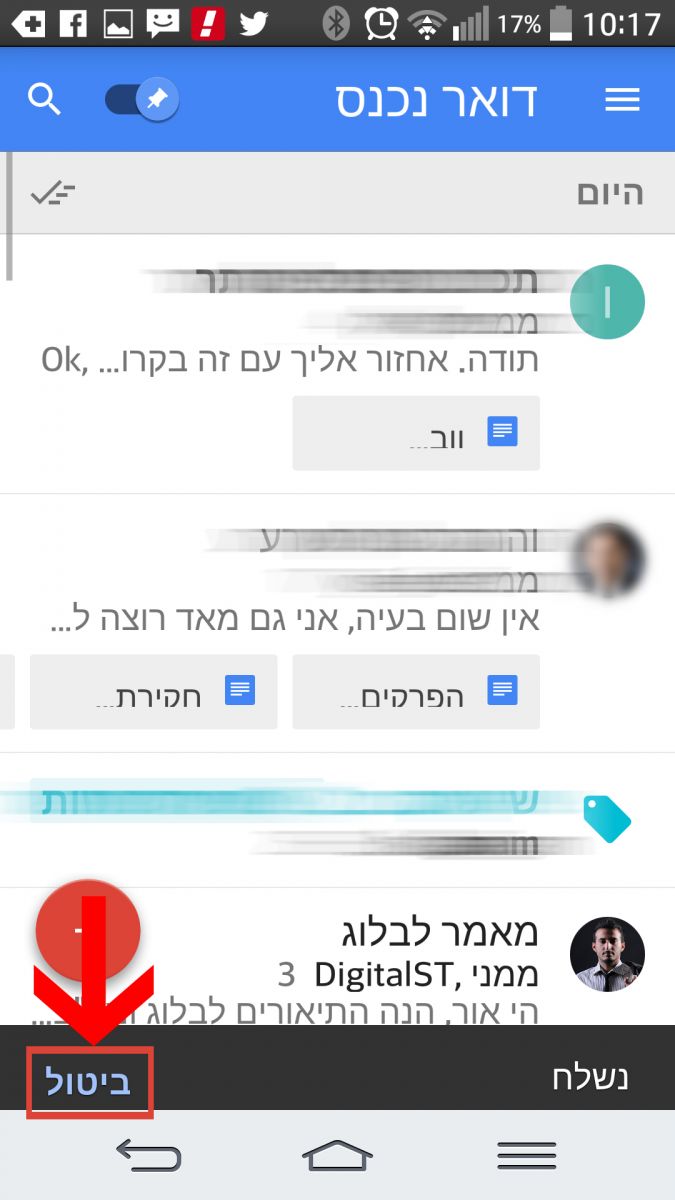
Chronologically, Google launched Inbox about a year ago in a beta version with the aim of improving the email services it provides to hundreds of millions of surfers around the world. The application was officially opened to the general public in June 2015 and introduced several advanced capabilities. One of the most famous and creative of them is the ability to reply to emails sent within 10 seconds by "Undo Send" revolutionary. Yes, instantly saved millions of embarrassing miles of "I forgot to attach the file". In addition, Inbox offers a variety of advanced options that really improve the ability to control the email box. Want samples? please!
Automatic email catalog
One of the great features of Inbox is automatically scanning the incoming mail and displaying relevant emails at the top of the list. The system sorts the rest of the mail itself into seven subcategories – Purchases (such as receipts), financial (e.g. financial emails from the bank), social mail (Facebook, Twitter, etc.'), updates (for example confirmation of joining a newsletter list), forums, marketing content and"low priority" (equivalent to spam). That is, all emails that are not sent personally and directly to you are automatically cataloged by the system. Doesn't sound bad? The system also allows you to control the cataloged emails and even easily delete entire groups with the click of a button.

estoppel
Let's assume for a moment that you leave the office on Thursday and have decided (for real this time) to disconnect for the whole Shabbat for the family. Inbox understands this need well and allows you to mute messages by date or location. You can even request that the mute be removed only when you physically arrive at the office.
Labeling without removing from the main box
If you are the old type who is addicted to organized folders (family, work, travel, insurance, gift for wife/husband, etc.'), you probably often come across a case where you tagged incoming mail but forgot to reply to it and handle it. Contrary to'The traditional email, in the inbox you can tag and leave the email in the main box until the work on it is finished. Freaks who are addicted to folders and order will find this application in a real row (and an end to anxiety!).
So what about you?
The new application of Inbox by Gmail is available for download and those who already use it testify that the world looks much more orderly and elegant together with it. Rumor has it that most of Google's development will now be directed to the new application and in a short time the familiar Gmail application will be nothing more than a status quo in cyberspace. So if you are aware of the technological changes and the meanings behind them, don't be left behind.